Introducing Pine Computer: A Computer Built for Humans AI
We changed the computer. Lower model costs and more task progress on SaaS-Bench v1.1.
By Dylan Wang
2–5× faster. 1/25 the model cost. More progress on the same tasks.1
GPT-5.6 Luna on Pine Computer passed more of each task’s checkpoints than Opus 5 with Claude Code: a 78.3% checkpoint score against 74.3%. Finishing a whole task is a different measure, and the table below gives both.
We’ve been solving the wrong problem.
Models have grown from billions to trillions of parameters. Harnesses have grown from a simple chat.completions call to millions of lines of code. Skills, connectors, and MCP servers are everywhere. Yet getting AI to do real-world work is still slow, expensive, and unreliable. Why do we keep assuming more of the same will fix it?
We made models smarter, then made them spend their intelligence compensating for the computer.
Over millions of real-world tasks at Pine AI, we kept running into this problem. At Agora, I had seen how rebuilding the underlying network could transform audio and video quality. What if AI needed the same kind of infrastructure change?
We analyzed millions of execution traces, especially from long-running tasks. Again and again, capable models were working around an environment built for someone else.
Pine Computer is a cloud computer built for AI. Give it a task through an API. It plans and works across the browser, files, and shell, returning progress and results.
The computer tells AI what changed.
Pine Computer rethinks how AI perceives its environment. Instead of repeatedly asking “what changed?”, AI receives notifications from the browser, applications, rendered display, and operating system.
Think of it as epoll for AI perception. Changes trigger attention. The model can act on what happened, with visual input available when needed.
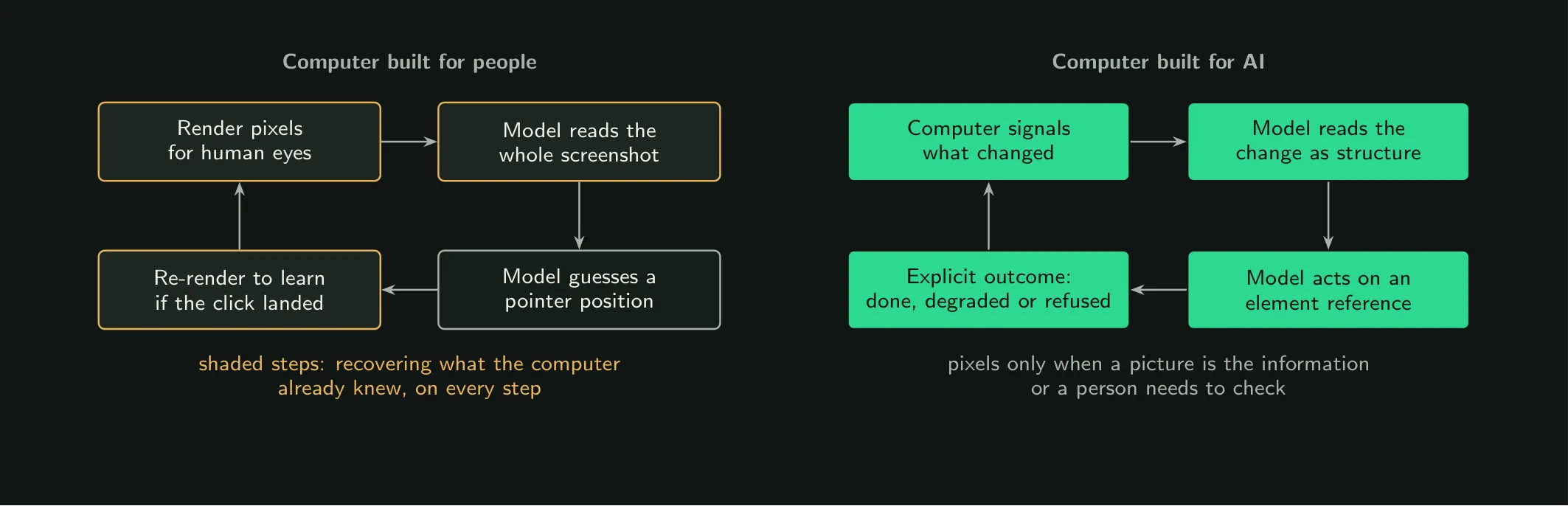
From our paper: redesigning the interaction between the model and its computer.
Personal computer vs. Pine Computer
| Personal computer | Pine Computer | |
|---|---|---|
| Instructions | A person directs the steps. | An application submits a task through an API. |
| Perception | A screen to watch and interpret. | Changes delivered directly to AI. |
| Parallel work | Desktop interaction shares a pointer and keyboard focus. | Multiple tasks across separate sessions and computers. |
| Human control | The person operates the computer. | Watch, take control, and hand it back to AI. |
| Security | AI uses the permissions granted on the user’s machine. | Each computer is sealed off on its own, with scoped access. Its saved state is encrypted with your own key. |
| Deployment | Work depends on the user’s machine. | Cloud computers integrated into your product. The laptop can be closed. |
The left column describes conventional desktop use; the right describes Pine’s built-in AI experience.
A lower-cost model. More task progress.
Our paper evaluates Pine Computer on SaaS-Bench v1.1: 106 tasks across 23 applications.
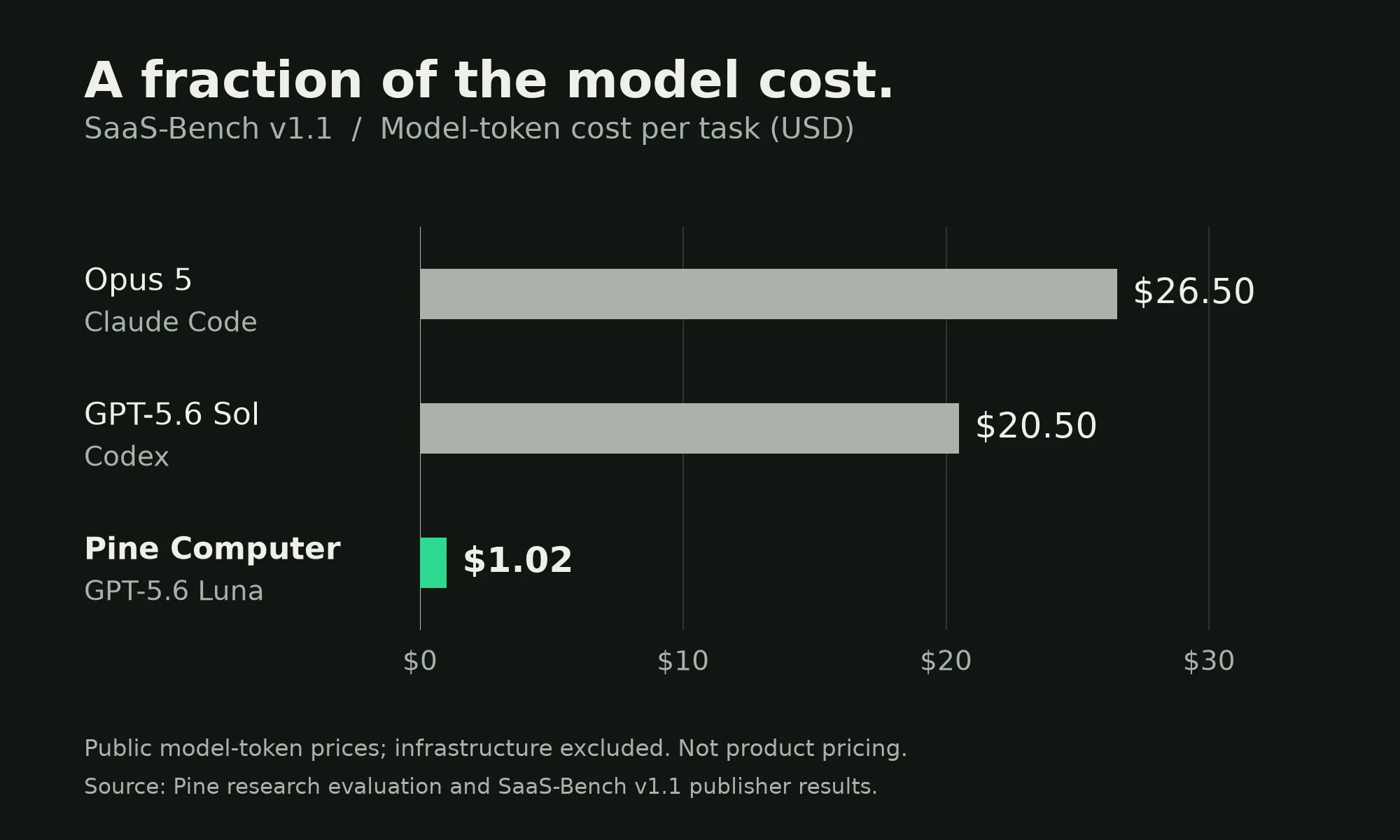
Pine Computer also reached a higher checkpoint score: the share of a task’s checkpoints a system passes along the way, not the share of tasks it finishes. Across all nine systems in the published table, cost and progress don’t move together.
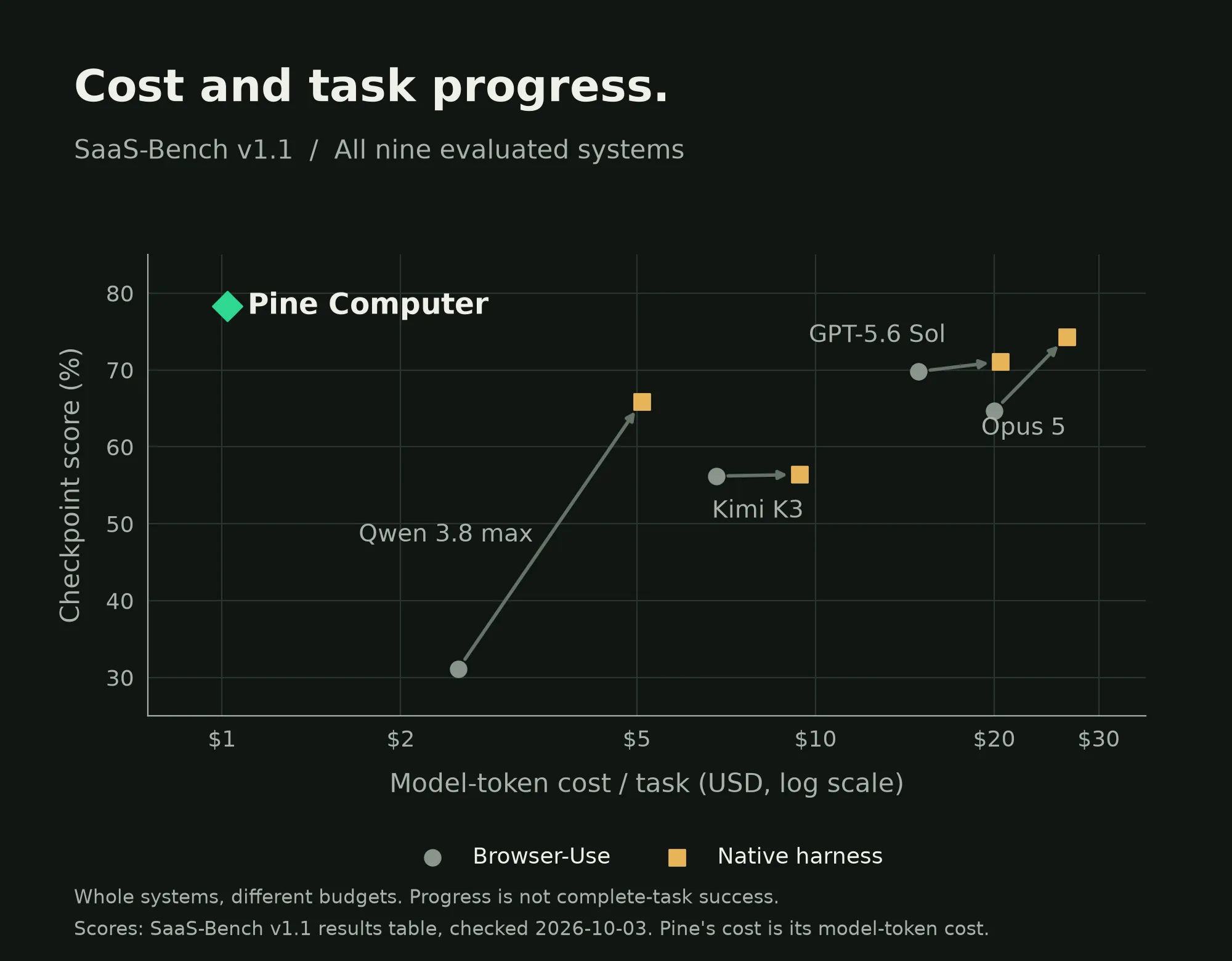
Cost is shown on a logarithmic scale. Arrows connect the same model in different harnesses. Scores are the published SaaS-Bench v1.1 table’s, checked 3 October 2026.
| System | Checkpoint score | Resolved score | Model cost / task |
|---|---|---|---|
| GPT-5.6 Sol with Codex | 71.1% | 29.2% | $20.50 |
| Opus 5 with Claude Code | 74.3% | 31.1% | $26.50 |
| GPT-5.6 Luna on Pine Computer | 78.3% | 27.4% | $1.02 |
The resolved score is the share of tasks a system finishes end to end. Pine passed the most checkpoints of the nine systems in the published table, and resolved fewer whole tasks than the two above. These are whole-system comparisons with different execution budgets, not an isolated test of the computer.
Checkpoint and resolved scores are the published SaaS-Bench v1.1 table’s. Costs are approximate model-token costs at public list prices, excluding infrastructure—not product prices. Pine’s cost figure comes from our paper and includes all attempts, averaged over 106 tasks.
This is just the beginning.
There is much more to improve in how computers help AI perceive, act, remember, and work in parallel. Today’s results are a starting point, not a ceiling.
We plan to publish more of Pine Computer’s design, implementation, evaluation tools, selected execution traces, and supporting data. We want others to reproduce these results, challenge them, and build on the work.
Pine Computer is in private beta. Join the waitlist.
Personal computers reshaped computing around people. Pine Computer starts from a different question:
What should a computer look like when its primary user is AI?
Questions you’re already typing
Is Pine Computer a model, a harness, or a VM?
Yes. In the cloud, it’s virtual computers + a harness + a runtime layer wired into the OS and browser + a matching set of local tools + remote API tools (media production, for example). On your side, it’s a developer-friendly SDK and API.
What do you actually do differently? Isn’t it a better prompt over screenshots?
No. We changed the computer, not the prompt. The operating system, the browser and the applications tell the model what changed, the way epoll tells a program, so it doesn’t re-read screenshots or an accessibility tree after every step (see The computer tells AI what changed, above). The model gets lean, precise context. That mechanism matters more than the model on top of it.
So is it your own model? Can I bring mine?
It can be. Today it runs Pine’s own model and GPT-5.6 Luna, our pick from the presets we tested on open datasets. Bringing your own model and API key is coming: a model gets in once it passes our benchmark checklist. We’d rather tell you no than let you ship something flaky.
2–5× faster at 1/25 the cost? Come on.
PCs were built for human eyes and hands. AI has neither. On a harness and runtime built for AI, the model gets smaller, leaner context and iterates faster, so lower-cost models finally get to show what they can do. On SaaS-Bench v1.1, Pine Computer with GPT-5.6 Luna spent about $1.02 in model tokens per task; Opus 5 with Claude Code spent $26.50.1
To be precise about what that means: these numbers come from benchmark tasks, and those are long, complex ones. We can’t promise the same speed or cost on every task, and a short, simple task won’t see the same gap. Nor is speed or cost the point of Pine Computer. The point is that AI gets a computer of its own.
Why does the public SaaS-Bench table show $3.60 for Pine, not $1.02?
The two figures measure different things. $3.60 is what the runs cost at the list price of our own consumer product: what a customer would pay. $1.02 is the model tokens at public list prices, the same basis as the other systems’ figures, so it’s the one to compare.
Did you overfit to a benchmark?
No. Our harness and runtime were iterated from the trajectories of millions of real-world tasks: ancient websites, broken websites, software that seems designed to resist being used. Benchmarks are where we report results, not where we learned.
Where are the results, and can I reproduce them?
Don’t trust us. Run it yourself. We’ve tested on OSWorld, OfficeVal, SaaS-Bench and more. So far we’ve only had the bandwidth to publish SaaS-Bench v1.1: the run results are on Hugging Face, and the summary is above. OfficeVal is next, and we plan to publish our evaluation tools so you can reproduce them. Help us run more benchmarks; we mean it.
What does the cost include?
Tokens: fully itemized, so you can price them against official list prices. Infrastructure: billed separately, easy to estimate from AWS and GCP list prices, and only running while your computers are. Third-party software: everything preinstalled locally is open source and free today; remote APIs are billed extra at the provider’s pricing.
What can I build with it?
Our own products came first. Pine Computer grew out of Pine AI’s two other product lines: pine.im, which gets real-world things done for small businesses, and pineforbusiness.com, which automates internal workflows for enterprises. Build those, or build what we haven’t thought of. Common scenarios are in our use cases.
Is this for consumers?
Pine Computer is for developers and software companies. People reach it through the products built on it.
Can it use my own tools?
It comes with built-in skills and tools, and it’s meant to work inside your product: in place of web search and the other APIs you’d otherwise wire up. Connecting your own tools is on the way.
Can I run it on my own machine?
No. It runs in our cloud, not on your machine. Your product or assistant reaches it through the API.
How fast does a computer start? Can I pause one?
A new computer starts in a few seconds. One with a lot of saved state takes around 15 seconds to restore. You can pause a computer, and a paused one resumes in under a second.
How many computers can I run at once?
As many as the work needs: computers run in parallel, and each one runs several sessions. During the beta, each project has a concurrency allowance; ask us to raise it.
Can several computers share one browser profile?
Not yet. Sign-ins are saved per computer, and one computer runs several sessions, each with its own workspace. Sharing a profile across computers is something we’re looking at.
What happens when a user needs to log into their own account?
Pine Computer fires a callback, and the user takes over the streaming screen and types the password themselves. Then they choose: remember it, or log in every time.
Why should anyone trust you with their logins? Or trust the apps built on you?
Fair question. Each computer is sealed off on its own, with scoped access. Its saved state is encrypted with your own key, protected by hardware in the cloud, and we can’t read it. These are mature, state-of-the-art industry practices. And we’ll open-source this part of the implementation, because trust has to be earned in the open.
Will it get blocked as a bot?
About as often as you do on a new laptop. Pine Computer ships a browser with a complete, PC-like fingerprint. When a CAPTCHA does show up, the AI tries it first. When it can’t get through, it does what you’d do: asks a human.
Footnotes
-
Pine’s preliminary internal tests against AI on conventional computers, including SaaS-Bench tasks against Claude Code with Opus 5. Results vary by task. Cost is model API cost only, from the same SaaS-Bench comparison. 2